Our EverLights permanent roofline lights stopped reliably turning on and off on schedule. Some nights they came on at sunset, some nights they didn’t, and some nights they stayed on until morning. The app worked fine when I tapped buttons, which made it hard to pin down.
It turned out to be two problems stacked on top of each other: a weak radio link between the bridge and the lights, and a corrupted SD card inside the bridge. Along the way I ended up building my own scheduler that runs on our NAS, and I learned more about FAT32 than I expected to.
The bridge has a local API
EverLights doesn’t document it, but the bridge serves plain JSON on your home network with no authentication. Cameron Spear reverse-engineered it from the phone app’s traffic and published a JavaScript SDK, CWSpear/everlights. That was my starting point.
You need the bridge’s IP address (the app shows it under Settings, then Bridge). Then:
curl http://192.168.1.50/v1                 # bridge status and zones
curl http://192.168.1.50/v1/sequences       # saved patterns
curl http://192.168.1.50/v1/events          # schedules
curl -X DELETE http://192.168.1.50/v1/zones/SERIAL/sequence   # off
The status call was the first real clue. Our single zone controller, in the attic, was talking to a bridge in the basement server closet at an RSSI around -101 dBm with an SNR of -109. That’s about as weak as a radio link gets while still working. The bridge had rebooted 32 times, and the zone controller 31.
That explained why the app seemed fine. When you tap a button and nothing happens, you tap again. A schedule fires once, at 6:28 PM, with nobody watching. If that one radio message gets lost, the lights just don’t change.
A scheduler that checks its work
Rather than trust the bridge’s schedules, I wrote a small web app that does the scheduling itself and runs in a container on our QNAP NAS. It works out what the lights should be doing every 15 seconds, and at each transition it:
- sends the pattern (or off) to the bridge
- reads it back to confirm the bridge accepted it
- retries with backoff if it didn’t: 30 seconds, then 1, 2 and 5 minutes
- sends it again 2 and 10 minutes later anyway, because the bridge only confirms what it accepted, not what the controller heard over the radio
It also handles sunset and sunrise offsets, weekday rules and yearly date ranges (Halloween patterns all October, for example), and it pushes an alert to my phone through ntfy if a change gives up or the bridge stops answering.
Catching the bridge in the act
To see whether the bridge’s own schedule was really the problem, I shifted my schedule five minutes later than the bridge’s and taught the app to log any change it didn’t make itself. If the bridge did its job, I’d see an outside change at 10:30 PM. If not, my app would do it at 10:35.
The first night, the bridge’s 10:30 PM off never happened. At 10:35 the app turned the lights off and confirmed it on the first try. That was the first hard evidence that the bridge’s scheduling, not just the radio, was letting us down.
“SD card error”
Meanwhile the EverLights app kept failing to delete a schedule, with a vague “failed to delete occurrence.” The local API was more honest. Deleting the event directly returned:
curl -X DELETE http://192.168.1.50/v1/events/EVENT-ID
SD card error
Power-cycling the bridge didn’t help, so I opened it up.
Getting to the SD card
Unplug the bridge first. The bottom plate comes off with four screws, one in each corner.
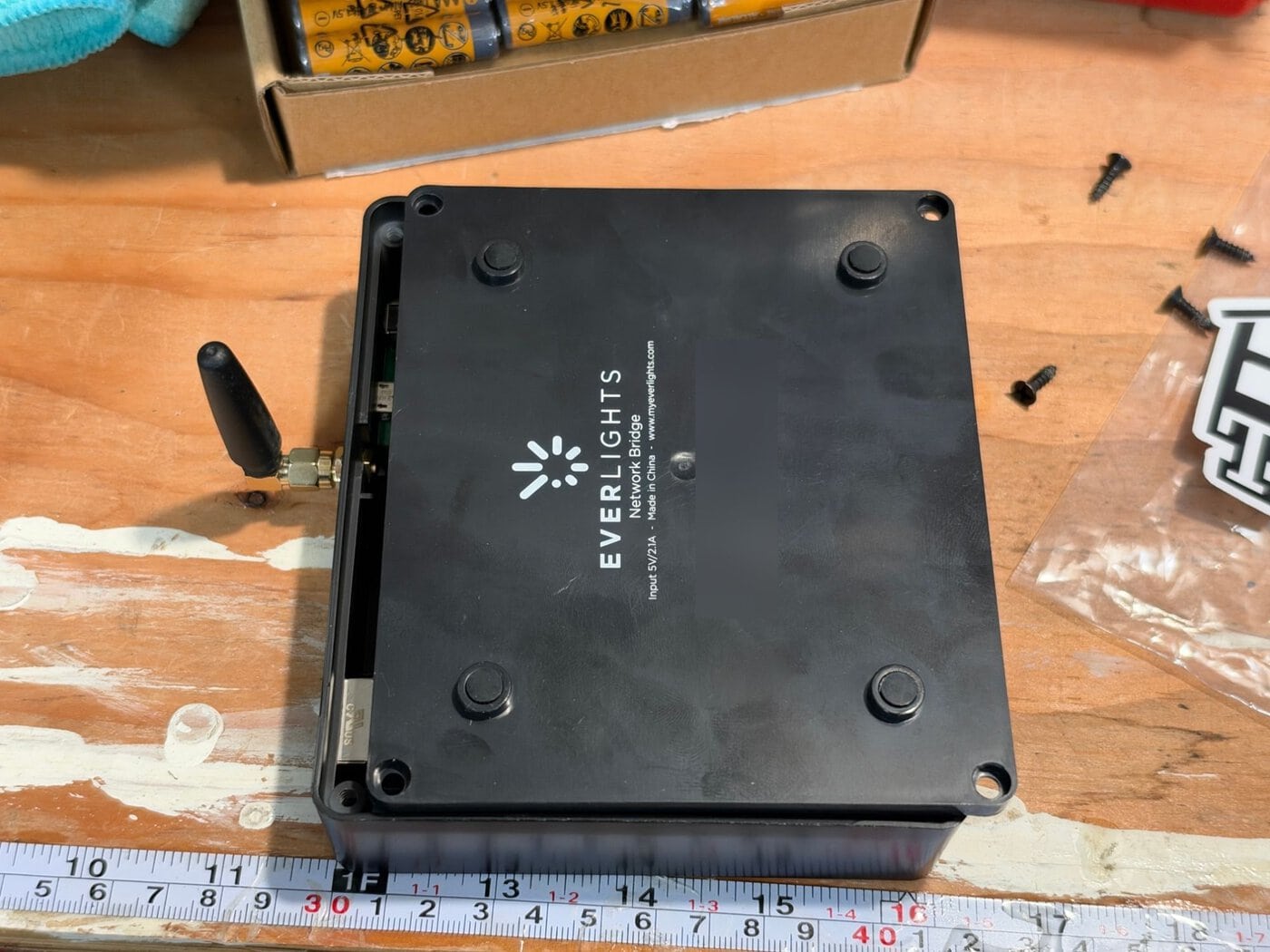
Inside there’s a main board, an off-the-shelf W5500 Ethernet module on a ribbon cable, and the radio. The microSD slot is on the main board, right next to the radio header.
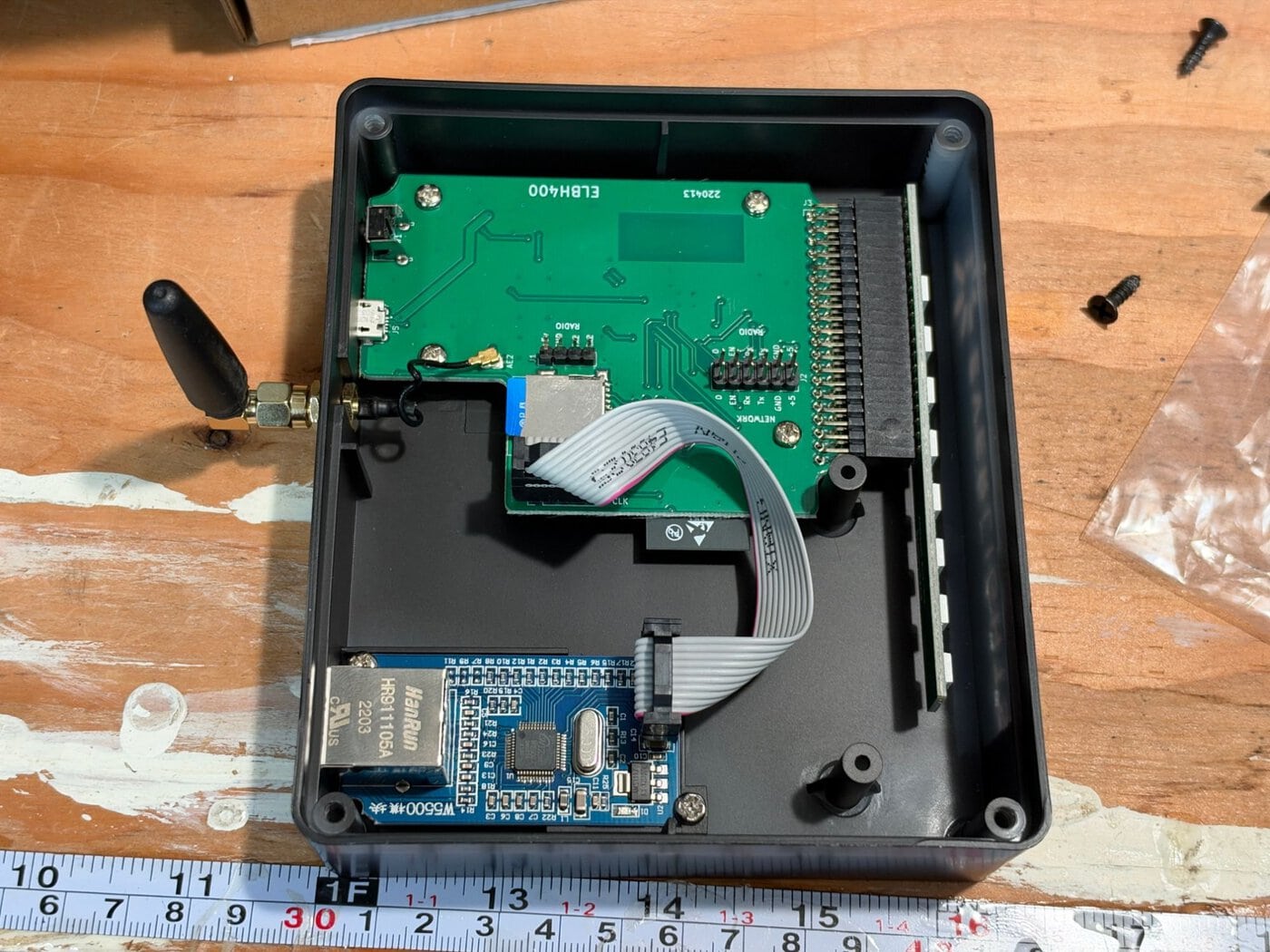
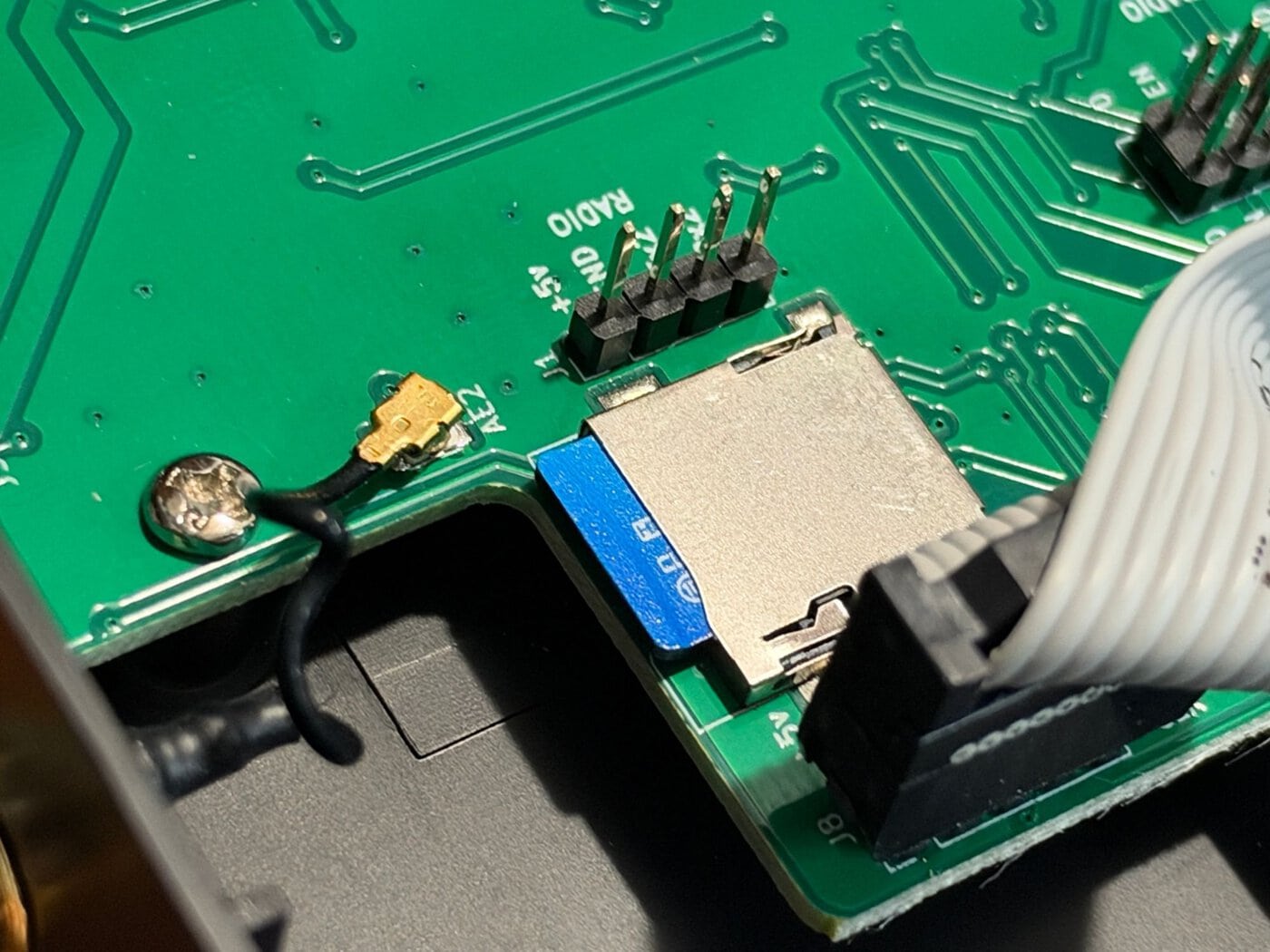
Before you put the card in a computer, know that your computer will probably write to it. Mine did, and it cost me part of the broken file (more on that below).
The card is FAT32, about 5 MB used, with folders for events, sequences and firmware, a zones.json and a .bootcount. The firmware files matched their checksums and all 100 pattern files parsed fine.
The schedule file didn’t. A read-only filesystem check showed why:
Warning: size of /EVENTS/9f386c18-....json is 1954, should at most be 0
Warning: /EVENTS/9f386c18-....json starts with free cluster
FAT32 keeps two records for every file: a directory entry with its name and size, and an allocation table saying which storage blocks it owns. For this file they disagreed. The directory said 1,954 bytes; the allocation table said the file owned nothing, and had marked its block as free. That’s classic damage from a write being cut off, and with 32 reboots on the clock, that fits. The bridge tripped over the inconsistency every time it tried to delete the file.
One more twist: because the block was marked free, my Mac happily reused it for its own Spotlight index the moment I plugged the card in. So the file’s contents were partly Apple’s data by the time I read it. Back up a card like this before you mount it anywhere, if you can.
The new card that didn’t work
To be careful, I left the original card alone and copied everything except the broken schedule onto a fresh card. The bridge booted from it, read zones.json and even wrote its boot counter, but it couldn’t list its schedules or patterns:
curl http://192.168.1.50/v1/sequences
Failed to get array stream
Reformatting with the same 32 KB cluster size as the original didn’t change anything. So I went back to the original card and repaired it in place: diskutil repairVolume fixed the allocation table, I deleted the broken schedule, and I removed the hidden folders macOS adds to any card it mounts:
sudo mdutil -i off "/Volumes/NO NAME"
sudo rm -rf "/Volumes/NO NAME/.Spotlight-V100" "/Volumes/NO NAME/.fseventsd"
Back in the bridge, it listed all 100 patterns and an empty schedule list, with no SD card error. At first I blamed the Spotlight folder, since every failed attempt had one. So I cleaned it off the new card and tried again. Still “Failed to get array stream.” My best guess now is that the bridge’s firmware doesn’t like folders created by macOS, but I haven’t pinned it down.
The practical lesson: if your bridge’s card gets corrupted, back it up and repair the original card in place rather than copying it to a new one. And clean the macOS folders off before it goes back in either way.
What it looks like now
The app has grown into the thing I wish the EverLights app was. It’s built for phones first and works great on one: add it to your home screen and it opens like a regular app.
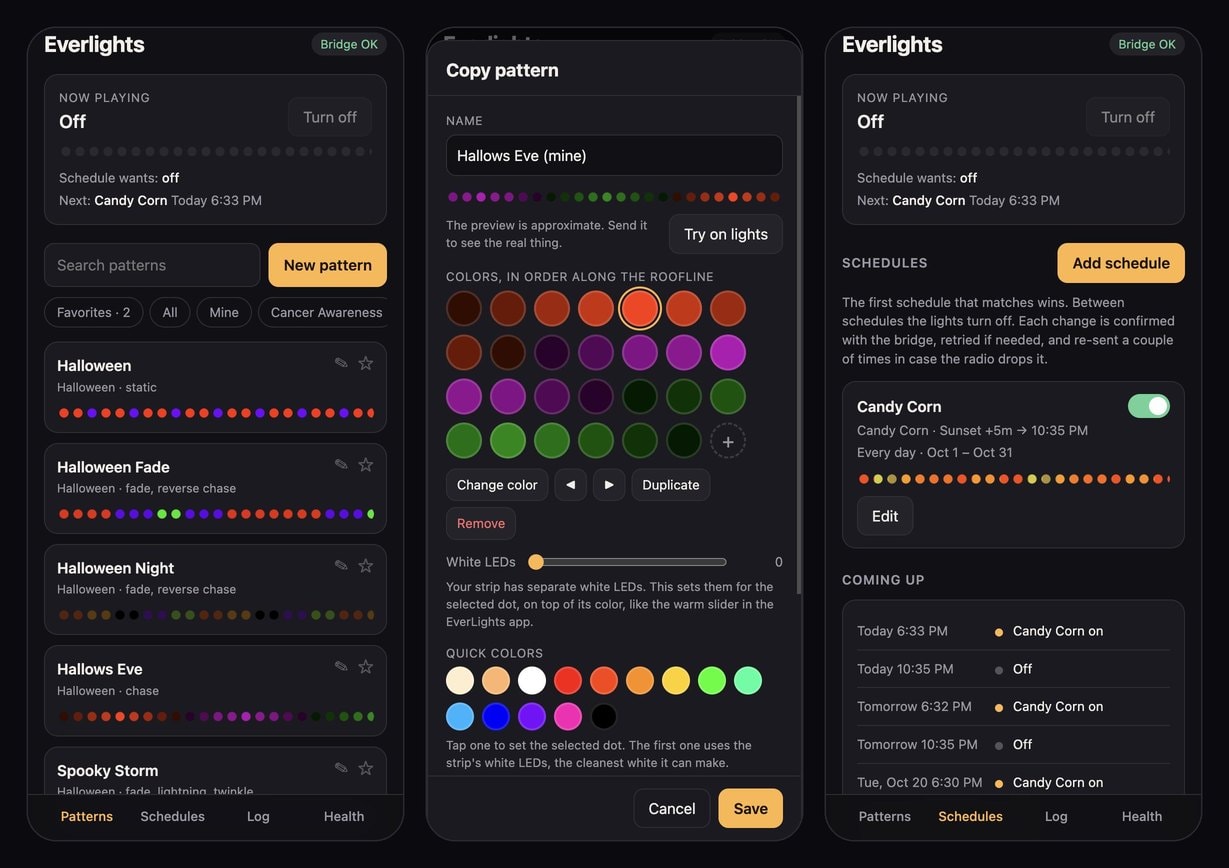
- a pattern chooser with animated previews and favorites
- a pattern maker, including the strip’s separate white LEDs, which the app exposes as its “warm” slider
- schedules with sunset offsets and date ranges, where every change is confirmed and retried
- push notifications through ntfy when the status changes: a scheduled change that gave up or needed retries, the bridge going offline and coming back, or a restart
- a Health tab with signal strength over time and a record of how every scheduled change went
- links like
/go/offthat Siri Shortcuts can call, so “Hey Siri, roofline off” works at home
Then I moved the bridge to the attic, a few feet from the controller, on an Ethernet switch that was already up there. The signal went from about -101 dBm to -81 dBm, roughly a hundred times stronger.
The code
It’s all on GitHub at razorfrog/everlights under the MIT license: the web app, the CLI and the notes on the bridge’s API. It’s plain Python with no dependencies, and runs anywhere Docker does on the same network as your bridge. It’s not affiliated with EverLights, and the API is undocumented, so a firmware update could break it.
Leave a Reply